

Imagine this: your agency just landed a fantastic new client, a national franchise with 220 locations. It is a huge win. Then, reality sets in. You need to create a unique, optimized webpage for every single one of those locations.
The temptation is real: create one solid page, then copy, paste, and swap out the city name and address. It is fast and easy, but it is also a direct path to an SEO nightmare.
This copy-paste method does not just underwhelm potential customers; it actively works against you in the eyes of search engines. Google’s own documentation warns against creating “doorway pages” that are all substantially similar, and boilerplate content can trigger duplicate content flags, diluting your ranking potential across all locations.
But here is the good news. There is a smarter, more scalable, and far more effective way: dynamic content templating. It is the secret to creating hundreds of unique, locally relevant pages that both users and Google will love.
Why Your “Good Enough” Location Pages Are Holding You Back
Before we dive into the “how,” let’s talk about the “why.” In today’s market, generic content is not just ineffective—it is a liability.
Consider the user. Your client’s customers are not looking for a generic corporate page; they are looking for their local store. Research shows that 84% of consumers believe a business’s local presence is crucial, and a staggering 76% expect to find localized information on a national brand’s website. When they find a page with only a new address slapped on, it feels disconnected and untrustworthy.
Then there is the SEO impact. Google’s goal is to provide the most relevant result for a user’s query, and a page that is 95% identical to 219 others is not a strong signal of local relevance. By treating each location as a unique entity, you unlock incredible growth potential. One case study revealed a 147% surge in organic traffic to location pages after they were updated with unique, localized content.
This is not just about avoiding a penalty. It is about seizing a massive opportunity for growth.
The Solution: Thinking Like a Mail Merge for Your Website
So, how do you create 220+ unique pages without an army of content writers? The answer is dynamic content templating.
If you have ever used a mail merge, you already understand the concept. You have one master document (the template) and a spreadsheet of unique information. The system then automatically pulls data from the spreadsheet to generate personalized versions of the document.
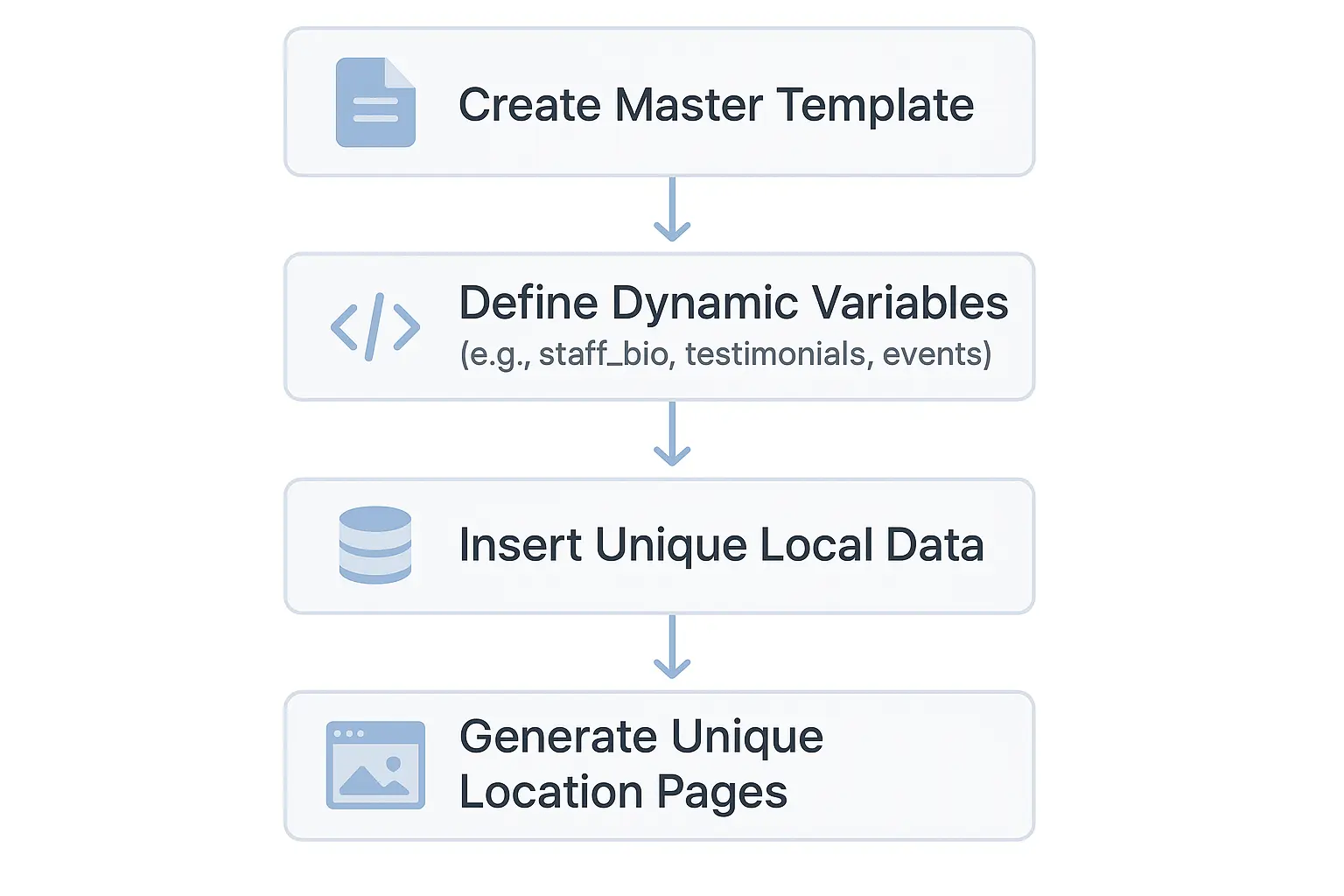
Dynamic content templating applies this same logic to your website. You build one master location page template and then programmatically pull unique data for each location from a central database or content management system (CMS).
The result is pages that are structurally consistent but contextually unique.

The core components are:
- The Master Template: This is the HTML/CSS framework that defines the layout, branding, and universal content that remains the same for every location.
- The Central Database: A simple spreadsheet or a sophisticated CMS can serve as the single source of truth for all your unique local data.
- Dynamic Fields: These are the placeholders in your template—like {cityname} or {localmanager_bio}—that tell the system where to insert unique data.
Building Your High-Performance Location Page Template
Ready to build a system that scales? Here is a breakdown of the process.
1. Define Your Universal Foundation
Start by identifying the content that will be the same on every page. This is your “boilerplate,” and that is okay—it provides brand consistency. This includes:
- The company’s “About Us” story
- Descriptions of core products or services
- Brand-wide mission and values
- Calls-to-action that apply to all locations
This content forms the skeleton of your master template.
2. Brainstorm Your Dynamic “Uniqueness” Fields
This is where the magic happens. Your goal is to find every piece of information that makes a location distinct. Every unique data point you include makes each page more valuable and distinct.
Here are some powerful dynamic fields to consider:
- The Basics: Location Name, Address, Phone Number, Hours of Operation.
- The People: A bio and photo of the local manager or key staff members.
- The Proof: Local customer testimonials or links to location-specific reviews (e.g., their Google Business Profile).
- The Results: Mini case studies of clients from that specific city or region.
- The Community: An embedded local event calendar or news about local sponsorships.
- The Vibe: Photos of the actual storefront, office interior, and local team.
- The Hyperlocal Touch: A section on local landmarks or a message like, “Proudly serving the families of {Neighborhood}.”
3. Source and Structure Your Local Data
A template is only as good as the data that feeds it. Work with your client to gather all the unique information for each location and organize it in a structured format, like a Google Sheet or Airtable.
This is often the most challenging step, but it is critical. For scaling tasks like writing dozens of unique staff bios or neighborhood descriptions, leveraging AI-driven content workflows can be a game-changer, ensuring quality and consistency without the manual overhead.
4. Implement and See the Difference
With your template designed and data organized, it is time for implementation. This usually involves a developer connecting your database to your website template.
The result is a transformation from a generic, uninspired page to a rich, locally focused resource that builds immediate trust and connection.
The Payoff: Growth, Not Just Compliance
By embracing dynamic templating, you move beyond simply avoiding duplicate content issues. You create a powerful engine for local SEO growth.
Each localized page becomes a highly relevant landing page for “near me” searches, capturing long-tail keyword traffic you would otherwise miss. You will see improved user engagement metrics—lower bounce rates, longer time on page—because you are giving people exactly what they are looking for. Most importantly, you will drive what every client wants: more local leads, calls, and foot traffic.
Frequently Asked Questions (FAQ)
How is this different from just copying and pasting?
Copying and pasting creates multiple static, identical files. Dynamic templating uses a single template file that displays different information based on the URL or user query. From a technical standpoint, it is far more efficient and scalable to maintain.
Will Google see this as cloaking?
Not at all. Cloaking is the practice of showing different content to search engines than to users. With dynamic templating, the content is the same for everyone; it is simply personalized to be more relevant to a specific location—a practice Google encourages.
What if we can’t get unique data for every single location?
Do not let perfect be the enemy of good. Start with the data you have. Even adding unique manager names, local photos, and specific testimonials for just 20% of your locations is a huge improvement. You can build on this foundation over time.
How can I check my client’s site for existing duplicate content?
The best way is to conduct a comprehensive technical SEO audit. Tools like Screaming Frog or Semrush can crawl a site and identify pages with a high percentage of duplicate content, giving you a clear roadmap for what to fix.
Your Path to Scalable Local SEO
For agencies managing multi-location businesses, the old way of doing things is no longer sustainable. Manually creating and updating hundreds of pages is both inefficient and ineffective.
Dynamic content templating is not a shortcut; it is a strategic framework for scaling authenticity. By building a system that automatically populates a master template with unique, local data, you transform a logistical headache into a competitive advantage. You will deliver better results for your clients, build more trust with their customers, and establish your agency as a leader in modern, scalable SEO.
To create a winning strategy for your multi-location clients, explore our complete guide to local SEO for a deeper dive.
