

You’ve been there. You present a stellar report to your law firm client. Organic traffic is up 40%. Keyword rankings for high-value terms are on page one. The line graph is a beautiful sea of upward green arrows.
You’re proud.
Then, the managing partner leans forward and asks the question that cuts through the data: “This is great, but how many of these clicks turned into actual, paying clients?”
Silence.
If you’ve ever fumbled for an answer, you’re not alone. According to the 2023 Legal Trends Report, a staggering 45% of law firms struggle to track and manage leads effectively. The gap between a website click and a signed retainer agreement has long been a black box for agencies.
But what if you could connect those dots? What if you could show, with undeniable clarity, that your SEO efforts didn’t just generate a lead—they generated a specific, high-value case?
This is about more than better analytics dashboards. It’s about integrating your client’s marketing engine (their website) with their business engine (their practice management software). This guide will walk you through connecting organic search leads to legal CRMs like Clio and MyCase, so you can finally close the loop and prove your agency’s true return on investment.
Why Standard Analytics Don’t Cut It for Law Firms
Google Analytics is a powerful tool. It tells you who is coming to your client’s website, how they found it, and what they did when they got there. But its story ends at the ‘Submit’ button on a contact form.
For a law firm, that’s where the real story begins.
The legal client journey is rarely linear. A potential client might find the firm through an organic search for ‘car accident lawyer near me,’ read a few blog posts, and then leave. A week later, they might return directly to fill out a contact form.
Standard analytics can tell you a lead was generated, but it can’t tell you if that lead:
- Was a qualified potential client.
- Booked a consultation.
- Signed a retainer agreement.
- Generated thousands of dollars in revenue.
This gap is critical in the legal space, where 61% of law firms don’t know their cost per client acquisition. When you can’t connect marketing spend to new clients, you can’t prove your value. The solution is to bridge the data gap between your marketing channels and the firm’s central nervous system: their CRM.
The Bridge Between a Click and a Client: Understanding Lead Attribution
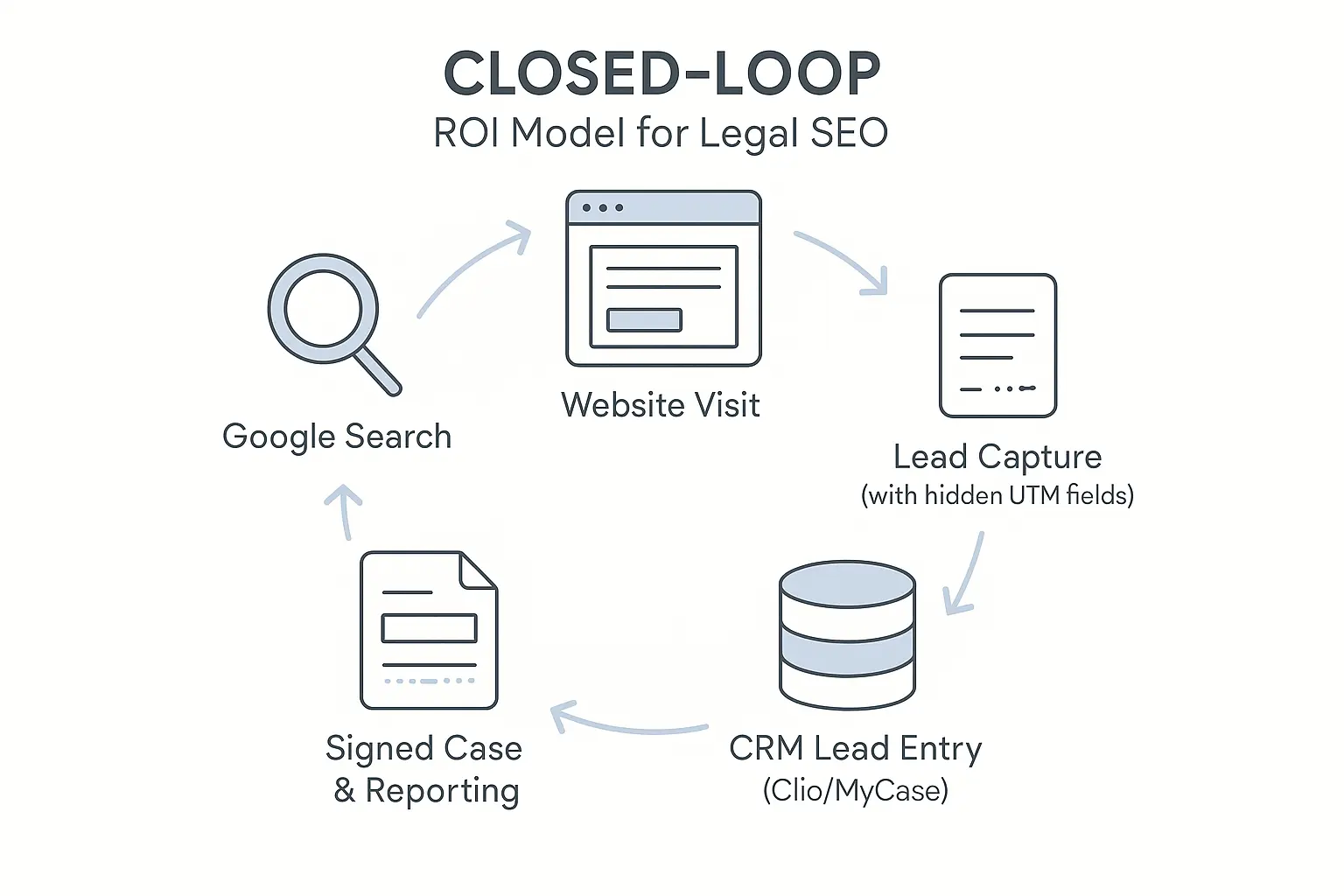
Lead attribution is a simple concept: it’s the process of giving credit to the marketing channels that bring in new business. For a law firm, this means passing information from the initial Google search click all the way through to its entry as a ‘new matter’ in Clio, MyCase, or another legal CRM.
This seamless flow doesn’t happen by magic. It requires a thoughtful setup that captures marketing data at the source and carries it through the entire client intake process.
Your Step-by-Step Guide to Connecting SEO Leads with Legal CRMs
Think of this process as building a digital assembly line. Each piece must connect perfectly to the next to ensure data flows from the initial search to the final case file without any leaks.
Step 1: Fortify Your Foundation – The Website Contact Form
The contact form is the most important bridge on your client’s website. It’s the handshake between an anonymous visitor and a potential client. To make this handshake meaningful, your form needs to do more than just collect a name and email.
It needs to include hidden fields.
These fields, invisible to users, automatically capture crucial marketing data from their browser session, such as:
- Source: Where did the user come from? (e.g., google)
- Medium: What type of channel was it? (e.g., organic)
- Campaign: Which specific marketing effort brought them in? (e.g., personalinjuryseo)
A robust form plugin like Gravity Forms or WPForms on your client’s WordPress site makes it easy to add these fields and capture the data for the next step.
Step 2: Tagging Your Traffic with UTM Parameters
So, how do we get data like ‘google’ and ‘organic’ into those hidden fields? Through UTM parameters.
UTM (Urchin Tracking Module) parameters are simple tags you add to a URL to track its performance. While often used for paid campaigns, they are just as crucial for tracking organic efforts and ensuring proper attribution.
When a user clicks an organic search result, their browser carries referral data. Your website’s job is to ‘catch’ this information and populate it into the hidden fields when they submit a form. A solid white-label SEO partner can help automate and manage this tracking process across multiple clients, ensuring every lead is properly tagged from the start.
Step 3: The Handshake – Connecting Your Form to the CRM
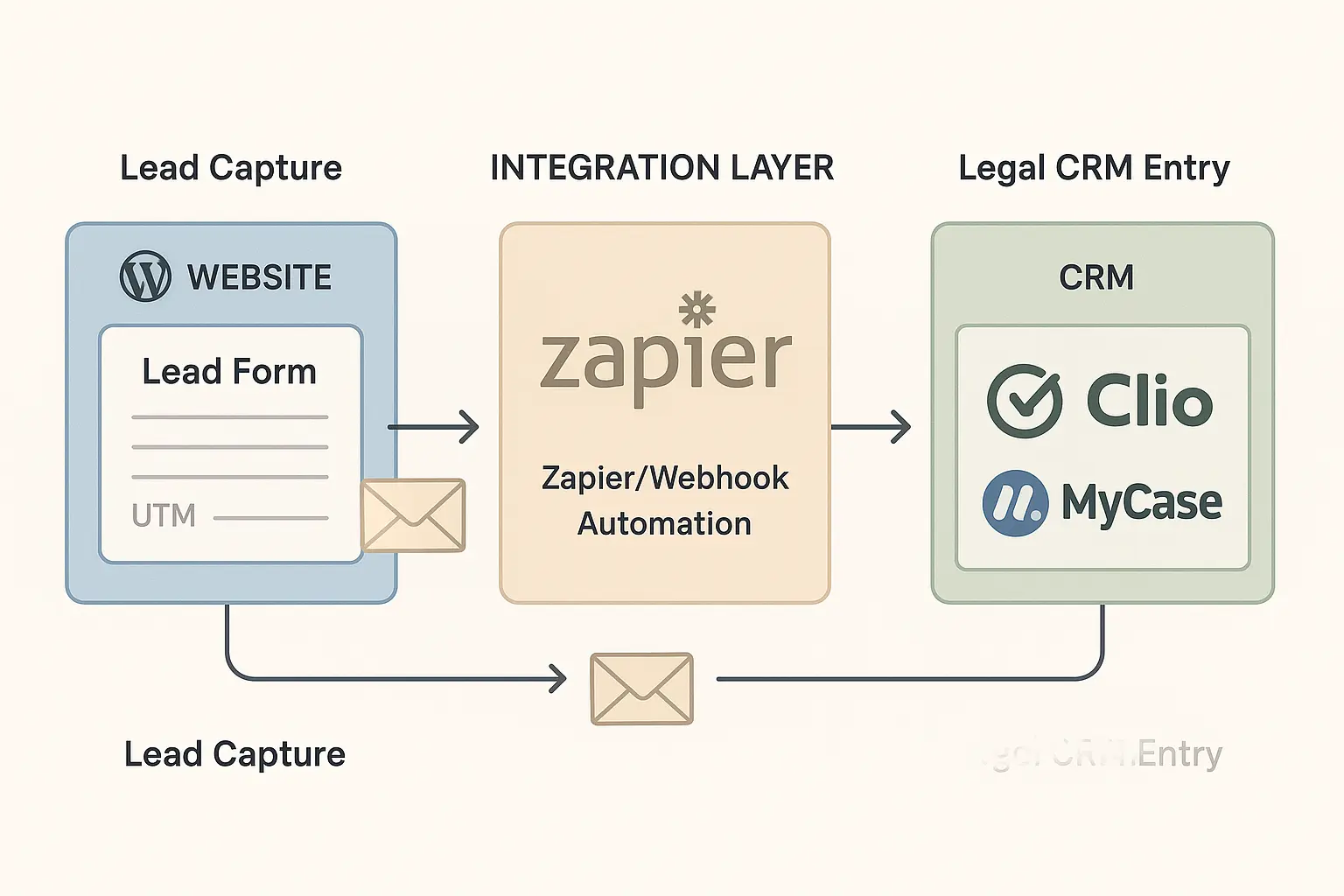
Now you have a form that’s capturing lead information and detailed marketing source data. The next step is to send that information directly into your client’s legal CRM.
This is where middleware tools like Zapier come in. Zapier acts as a translator between two different apps that don’t have a native connection. You can create a simple ‘Zap’ (an automated workflow) that says:
Trigger: When a new form is submitted on the website…
Action: …create a new ‘Lead’ or ‘Matter’ in Clio, and populate the custom fields with the UTM data from the hidden form fields.
This automated handshake ensures that every web lead is instantly and accurately entered into the firm’s practice management software, complete with the marketing source data attached. No more manual data entry, no more lost leads.
Step 4: Closing the Loop – From Lead to Signed Case
Once the lead data is in the CRM, the law firm’s intake team takes over. As they work with the potential client, they’ll update the lead’s status within the CRM:
- Initial Lead to Contacted
- Contacted to Consultation Scheduled
- Consultation Scheduled to Qualified Lead
- Qualified Lead to Signed Retainer
The original marketing source data (google, organic) you passed into the CRM stays with the lead through every stage. When a lead’s status is finally changed to ‘Signed Retainer,’ you have definitive proof: your SEO campaign generated a paying client.
The Payoff: Reporting on True SEO ROI
With this integration, your client conversations change completely. Instead of just reporting on traffic and rankings, you can build reports directly from their CRM data that show the real-world business impact of your work.
Instead of saying: ‘We generated 100 website visits from the term ‘divorce lawyer.”
You can now say: ‘Our organic SEO strategy for the term ‘divorce lawyer’ generated 15 form submissions. Of those, 6 became qualified leads, and 2 have signed retainers, resulting in an initial $15,000 in revenue for the firm.’
This is the holy grail of agency reporting. You’re tying marketing activities directly to dollars and cents, transforming your agency from a service provider into an indispensable SEO partner for agencies focused on growth.
You’re no longer just an expense on their balance sheet but a measurable driver of their firm’s success.
Frequently Asked Questions (FAQ)
What is a legal CRM?
A legal CRM (Customer Relationship Management) or Practice Management Software is a tool law firms use to manage everything from client intake and case files to billing and scheduling. Popular examples include Clio, MyCase, PracticePanther, and Filevine.
Do I need a developer to set this up?
Not necessarily. Using tools like WPForms and Zapier, a technically savvy marketer can often set up the basic integration. However, for more complex setups or custom CRM fields, you may need development assistance to ensure the data mapping is flawless.
Does this work for other traffic sources besides SEO?
Absolutely. This attribution model works for any digital channel. You can use unique UTM parameters for Google Ads, social media campaigns, email newsletters, and more, allowing you to compare the ROI of every marketing channel side-by-side.
Is this process secure for sensitive client data?
Yes. When set up correctly with reputable tools, the data transmission is secure. Zapier and major CRM platforms use encryption and are designed to handle sensitive information. It’s crucial to ensure all tools are compliant with data privacy standards relevant to the legal industry.
What if our client’s law firm doesn’t use a CRM?
This is a great opportunity for your agency to add value beyond marketing. You can educate them on the benefits of a CRM for streamlining their intake process. The fact that a CRM also enables better marketing ROI tracking is a powerful incentive for them to adopt one.
From Data Points to Demonstrable Value
In a competitive market, agencies that can prove their financial impact are the ones that retain and grow their client base. Integrating your SEO efforts with a client’s legal CRM elevates your reporting from vanity metrics to true business intelligence.
It’s the definitive answer to the question, ‘Is our marketing working?’ By building this bridge, you aren’t just providing SEO services; you’re delivering the clarity and confidence clients need to invest in their growth.
Mastering this integration is key to elevating your agency’s service delivery. Explore how a modern, automated approach can streamline this for all your clients. Learn more about how AI-powered SEO automation can make this process scalable and efficient.
